Playable Vectrex game
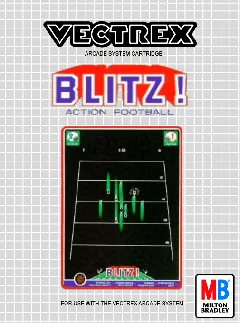
About Blitz! - Action Football
Play one of the earliest console football simulations, programmed by Jeff Corsiglia with downs, passing, kicking, penalties, and simultaneous two-player action.
- Collection
- Games
- Classification
- Official library
- Catalog year
- 1982
- Programmed by
- Jeff Corsiglia
- Designed by
- Jeff Corsiglia
- Publisher
- GCE / Milton Bradley
- Genre
- Sports, American football
- Players
- 1–2 players; two-player simultaneous
- Research confidence
- verified
- ROM editions
- 1
- Browser controls
- Keyboard, joystick, or gamepad
Development and history
Blitz! was released for Vectrex in 1982 and is credited to Jeff Corsiglia. It condensed American football into a sparse vector field with play selection, downs, yardage, passing, rushing, punts, field goals, and post-game statistics.
The game is especially notable for supporting simultaneous two-player action through the Vectrex’s second controller port. Its solo mode is more limited—the computer handles its own possessions quickly—but the two-player design shows how GCE tried to move beyond simple score-attack arcade ports.
This page uses one stable canonical URL for the title and loads its embedded ROM directly into the emulator after the Vectrex BIOS is ready.
Gameplay and background
Choose an offensive or defensive play, snap before the delay penalty, run or pass by directing the joystick toward a receiver, and kick when field position calls for it. A second controller provides the most complete head-to-head experience.
How to play in Vectrexia
- Move with the Arrow keys or WASD. Compatible controllers can use the left analog stick or D-pad.
- Vectrex buttons 1–4 map to Z, X, C, and V, and to the standard face buttons on most gamepads.
- Press a controller button after connecting it so the browser can expose the gamepad to the page.
Audio may begin after the first click, key press, or controller input because browsers can restrict autoplay.
Research sources
Available editions
Alternate dumps and revisions share this canonical page to avoid duplicate search pages. Choose a specific edition from the in-app Library.