Playable Vectrex game
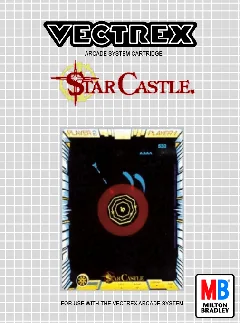
About Star Castle
Break rotating shield rings and destroy the central cannon in Bill Hawkins’s Vectrex adaptation of the classic Cinematronics vector game Star Castle.
- Collection
- Games
- Classification
- Official library
- Catalog year
- 1983
- Programmed by
- William “Bill” Hawkins
- Designed by
- Tim Skelly (arcade original), Scott Boden (arcade programming)
- Publisher
- GCE / Milton Bradley under license from Cinematronics
- Genre
- Multidirectional shooter, Arcade conversion
- Players
- 1–2 players, alternating
- Research confidence
- verified
- ROM editions
- 1
- Browser controls
- Keyboard, joystick, or gamepad
Development and history
Star Castle was designed by Tim Skelly for Cinematronics, with Scott Boden credited on the arcade original. GCE released a Vectrex version in 1983, and VGDB credits Bill Hawkins with the console programming.
The concentric vector shields and central turret are an especially natural match for the Vectrex display. The port preserves the push-and-pull of opening a firing lane while trying not to make the exposed cannon too aggressive.
This page uses one stable canonical URL for the title and loads its embedded ROM directly into the emulator after the Vectrex BIOS is ready.
Gameplay and background
Circle the fortress, shoot through rotating shield segments, and fire through the opening at the center. Destroying too many ring sections can increase the threat from the central cannon, so controlled openings and movement are safer than indiscriminate fire.
How to play in Vectrexia
- Move with the Arrow keys or WASD. Compatible controllers can use the left analog stick or D-pad.
- Vectrex buttons 1–4 map to Z, X, C, and V, and to the standard face buttons on most gamepads.
- Press a controller button after connecting it so the browser can expose the gamepad to the page.
Audio may begin after the first click, key press, or controller input because browsers can restrict autoplay.
Research sources
Available editions
Alternate dumps and revisions share this canonical page to avoid duplicate search pages. Choose a specific edition from the in-app Library.